
Camera 4S - Secret Photos1.02 - App Store
You'll be able to see results in few seconds.
Publisher Description
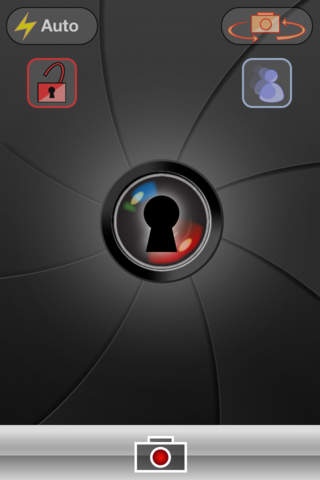
Take the pictures that you should not take and save them in private and secure folders.
This app allows you , in an easy and quick way, take this photos that for some reason should stay away from the sight of people who have access to your phone.
Having made the pictures, you can save it directly to your Dropbox account and remove them from your device, so there will be no proof of your actions.
Take photos in private mode
Programable private mode
Unlimited private identifiers
Ability to save your private pictures in Dropbox
Ability to save your pictures to the computer via iTunes
You can configure the photo's quality to save space in your device
Ability to add photos from camera roll and capture camera
A simple user interface allows you to quickly take your private photos. Just enable the privacy mode by entering your ID and each tap on the capture button will take a private photo.
It can be useful when:
- You go party and want to have photos with this beautyfull boy or girl and do not want anyone to see it (your partner, your parents...)
- You use the business phone for personal stuff and do not want your boss to find those inappropiate pictures
Functional description:
-The private mode is enabled by entering a numeric identifier, since that moment all the pictures are saved in the private folder associated with the identifier.
-You have unlimited numeric identifiers. You can have one or more trap identifiers with usual photos so if someone asks you about your private photos you can show this trap pictures, while the real private photos are stored in other identifier.
-Don t check any password so if someone tries to enter with the wrong identifier, it just capture photos for this id. and don t warn about 'wrong password' so ,who knows how many identifiers you have ?
-Programmable private mode duration. If you know the next few hours you will be on party and need a private capture mode, configure it and all pictures taken until the end of program will be saved to your private folder.
-You can enable file sharing via iTunes so when you plug your device to iTunes you can save your pictures to the computer, or you USB Memory.
-You can also save photos directly to your Dropbox account.
This prevents you send the photos by email and keep the copy in 'Sent Messages' folder where anyone with access to your computer or device can see them.
- When private capture is enabled, if you want to access the settings for that identifier and see your private photos you must write again your ID. This ensures that even when you leave private capture ON, nobody will see your photos unless he know your ID
Requires iOS 4.0 or later. Compatible with iPhone, iPad, and iPod touch.
About Camera 4S - Secret Photos
The company that develops Camera 4S - Secret Photos is Juan Penche. The latest version released by its developer is 1.02.
To install Camera 4S - Secret Photos on your iOS device, just click the green Continue To App button above to start the installation process. The app is listed on our website since 2011-11-04 and was downloaded 0 times. We have already checked if the download link is safe, however for your own protection we recommend that you scan the downloaded app with your antivirus. Your antivirus may detect the Camera 4S - Secret Photos as malware if the download link is broken.
How to install Camera 4S - Secret Photos on your iOS device:
- Click on the Continue To App button on our website. This will redirect you to the App Store.
- Once the Camera 4S - Secret Photos is shown in the iTunes listing of your iOS device, you can start its download and installation. Tap on the GET button to the right of the app to start downloading it.
- If you are not logged-in the iOS appstore app, you'll be prompted for your your Apple ID and/or password.
- After Camera 4S - Secret Photos is downloaded, you'll see an INSTALL button to the right. Tap on it to start the actual installation of the iOS app.
- Once installation is finished you can tap on the OPEN button to start it. Its icon will also be added to your device home screen.
Program Details
System requirements
Download information
Pricing
Version History
version 1.02
posted on 2011-11-04
Disclaimer
Official App Store Link
We do not host Camera 4S - Secret Photos on our servers. We did not scan it for viruses, adware, spyware or other type of malware. This app is hosted by Apple and passed their terms and conditions to be listed there. We recommend caution when installing it.
The App Store link for Camera 4S - Secret Photos is provided to you by apps112.com without any warranties, representations or guarantees of any kind, so access it at your own risk.
If you have questions regarding this particular app contact the publisher directly. For questions about the functionalities of apps112.com contact us.
